
Getting started with Helpdrops
A short guide for organization managers: five steps from submitting your organization to your first help request.
-
Create or claim your organization
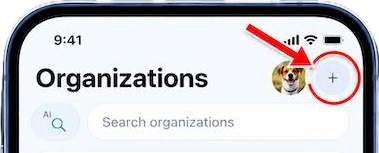
The easiest way to start is in the Helpdrops app. Open Organizations, tap the “+” button (Suggest organization) and submit your organization. Once it is approved, you automatically become its manager.
Already submitted your organization through the website? Contact support from the email address of your Helpdrops account and we will connect your account to the organization.
-
Complete your organization profile
Open your organization in the app and tap “Page”. Add a logo, a cover, a description and photos so people understand what you do.
-
Share an update
On your organization page, tap “+” and choose “Add news”. A short first post brings your profile to life and appears in your followers’ news feed.
-
Create a help request
Tap “Help requests” on your organization page and describe what help you need: in person, remote skills, items or transport. People respond in the app, and you can talk to them in a chat.
For each response you can choose “Accept”, “Needs details”, “Reserve” or “Decline”, and mark the result once the help is done.
Share the link to your request on social media: it opens as a web page, so people can see it even without the app.
-
Set up donations
To accept donations, add your PayPal details when you submit your organization. To add or change them later, contact support.